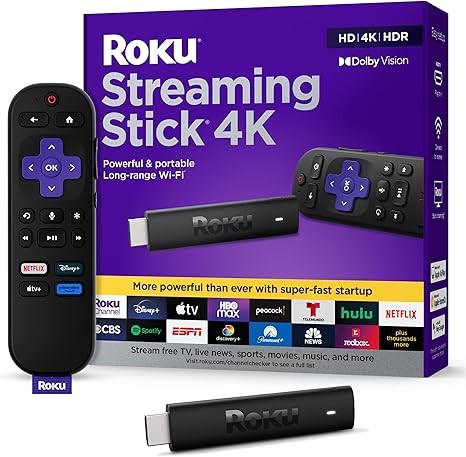
Roku Streaming Stick 4K
Best for: Best budget 4K streaming stick — turns any TV into a smart TV with 4K, Dolby Vision, and HDR10+. Voice remote controls your TV too. 500+ free live channels, long-range WiFi. 4.7★ with 83% five-star across 98,000+ reviews.
How we pick: we feature gadgets we’ve actually used or tested, score them honestly, and only recommend the ones that earn it. We may earn from qualifying Amazon purchases.
TidyHacks verdict
Video coming soon
We're filming the TidyHacks Short for this product. Subscribe on YouTube to catch it first.
Our review
At 4.7 stars with 83% five-star across 98,000+ reviews, the Roku Streaming Stick 4K is one of the most trusted streaming devices on Amazon. It is the easiest way to give any TV with an HDMI port a full smart-TV upgrade for around $44.
Setup is famously simple — plug the slim stick into your HDMI port (it hides behind the TV without blocking neighbouring ports), connect the USB power cable, join your WiFi, and you are streaming in minutes. The long-range WiFi receiver built into the power cable handles rooms far from the router, where many sticks buffer.
Picture quality is excellent: sharp 4K, Dolby Vision, and HDR10+. The voice remote is the standout feature — press the mic button to search across all your apps at once ('find nature documentaries'), and it also controls your TV's power, volume, and mute, so you can ditch a second remote. You get 500+ free live TV channels plus all the major apps (Netflix, Prime Video, Hulu, Disney+, YouTube), and Apple AirPlay support.
The downsides: it is WiFi-only (no ethernet) and depends on a solid connection — it can feel slightly sluggish switching apps on a weak network. It requires the included power cable because the WiFi antenna is built into it (you can't swap in any random USB cable). The four sponsored app shortcut buttons on the remote aren't reprogrammable. And the 3% one-star rate includes occasional remote-pairing complaints. But for the price, picture quality, and simplicity, it is a standout.
👍 Pros
- Turns any HDMI TV into a 4K smart TV
- Dead-simple setup — streaming in minutes
- Voice remote controls your TV power + volume too
- Search across all apps at once by voice
- Long-range WiFi reaches rooms far from router
- 500+ free live TV channels + all major apps
- Apple AirPlay compatible
- 83% five-star across 98,000+ reviews
- Hides behind TV, doesn't block HDMI ports
👎 Cons
- WiFi-only — no ethernet port
- Must use the included power cable (built-in antenna)
- Can feel sluggish switching apps on weak WiFi
- Four sponsored remote shortcut buttons aren't reprogrammable
- 3% one-star — occasional remote-pairing issues
Specifications
| Type | 4K streaming media stick |
|---|---|
| Resolution | 4K, Dolby Vision, HDR10+ |
| Connection | Built-in HDMI, long-range WiFi |
| Remote | Voice remote with TV power, volume, mute |
| Free content | 500+ free live TV channels |
| AirPlay | Apple AirPlay compatible |
| Includes | Stick, voice remote, 2 AAA batteries, power cable + adapter |
| Brand | Roku |
FAQ
Will it work with my TV?
Yes — it works with any TV that has an HDMI port. For 4K picture you need a 4K TV, but it also works on HD TVs (outputting in HD). No smart TV required.
Do I need to pay a subscription?
No subscription for Roku itself. You get 500+ free live channels and free apps. Paid services like Netflix or Disney+ require their own subscriptions, but plenty of free content is available.
Does the remote control my TV?
Yes — the voice remote controls your TV's power, volume, and mute in addition to the Roku, so you can use one remote for everything.
Is it good for travel?
Yes — it is compact and portable. Take it to hotels or second homes. Note you must bring the included power cable since the WiFi antenna is built into it.
More Tech & Smart Home reviews
Get the best Amazon finds each week
One short email. New reviews, viral finds and the odd deal. No spam.