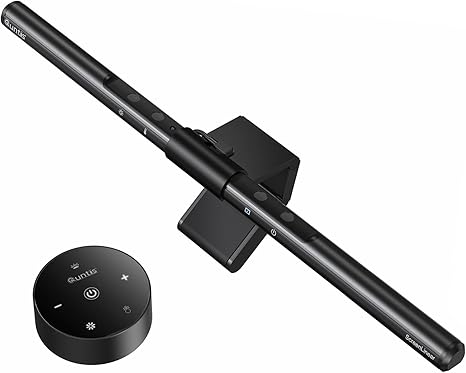
Quntis Monitor Light Bar
Best for: Best monitor light bar — asymmetrical optics illuminate desk without screen glare. Auto-dimming, touch control, 3000K-6500K colour temp, USB powered. Ra98 colour rendering. 4.6★ with 79% five-star across 13,500 reviews.
How we pick: we feature gadgets we’ve actually used or tested, score them honestly, and only recommend the ones that earn it. We may earn from qualifying Amazon purchases.
TidyHacks verdict
Video coming soon
We're filming the TidyHacks Short for this product. Subscribe on YouTube to catch it first.
Our review
If you work at a computer for 8+ hours a day, a monitor light bar is one of the best upgrades you can make for your eyes and workspace. The Quntis ScreenLinear clips onto the top of your monitor, illuminates your desk and keyboard perfectly, and produces zero glare on the screen.
The asymmetrical optical design is the key feature — the light shines downward and forward onto your desk, not back at the screen. The auto-dimming sensor continuously monitors ambient brightness and adjusts to maintain 900 lux, preventing both too-bright and too-dim conditions that cause eye strain. Touch controls let you adjust brightness and colour temperature from 3000K warm to 6500K cool.
78 high-quality LED beads deliver Ra98 colour rendering — near-perfect colour accuracy for designers and professionals. USB powered (plugs into your monitor or any USB port). The weighted clip mounts securely without tools. It turns on and off with your monitor.
The downsides: the mounting clip angle adjustment can be fiddly (sometimes needs two hands). Not all monitors have enough bezel for the clip to grip. And at $34, it costs more than a basic desk lamp. But the targeted, glare-free illumination is genuinely different from any desk lamp — once you try it, you will not go back.
👍 Pros
- Zero screen glare — asymmetrical optics
- Auto-dimming sensor adjusts to room brightness
- Touch control for brightness + colour temperature
- Ra98 colour rendering — near-perfect accuracy
- USB powered — turns on/off with monitor
- Weighted clip mounts without tools
- Saves desk space vs traditional lamps
- 79% five-star across 13,500 reviews
👎 Cons
- Clip angle adjustment can be fiddly
- Not all monitors have enough bezel for the clip
- $34 — more expensive than basic desk lamps
- 3% one-star — some mounting issues
- Auto-dimming may not suit all preferences
Specifications
| Type | Monitor-mounted LED light bar |
|---|---|
| LEDs | 78 high-quality LED beads |
| Colour rendering | Ra98 (near-perfect) |
| Colour temp | 3000K-6500K (warm to cool) |
| Dimming | Auto-dimming + stepless manual |
| Power | USB (5V) |
| Length | 15.7 inches |
| Mount | Weighted clip — no tools |
| Brand | Quntis |
FAQ
Does it create glare on the screen?
No — the asymmetrical optical design directs light downward onto your desk only. The screen remains glare-free. This is the primary design purpose and what distinguishes it from a desk lamp.
Does it fit curved monitors?
Yes — the weighted clip design fits both flat and curved monitors. Ensure your monitor has at least a small bezel at the top for the clip to grip.
How does auto-dimming work?
A built-in sensor continuously monitors ambient room brightness and adjusts the light output to maintain optimal 900 lux illumination. It brightens in darker rooms and dims in brighter conditions.
Does it turn on automatically?
If USB powered from your monitor, it turns on when the monitor powers up and off when it shuts down. From a wall USB adapter, it stays on until manually toggled.
More Tech & Smart Home reviews
Get the best Amazon finds each week
One short email. New reviews, viral finds and the odd deal. No spam.